
· Product updates · Donatas · 2 min read
Save Credits on Re-runs: Introducing "Skip Sub-Page Scrape for Known Products"
Stop burning credits re-scraping static detail pages. On re-runs, Gluedly now automatically reuses details from your last successful scrape for known URLs, only opening sub-pages for brand-new products.
If you monitor high-volume e-commerce stores, real estate listings, or job boards, you know how quickly credit costs scale up.
When running daily or hourly scrapes on listing pages, over 80% of the products on the page stay exactly the same. Yet, traditional scraping setups force your workers to open every single product detail sub-page on every run—wasting your compute time, proxy bandwidth, and API credits on static data you already collected yesterday.
To help you scale your monitoring pipelines without blowing your budget, we are excited to release Skip Sub-Page Scrape for Known Products.
How It Works: Dynamic Smart Caching
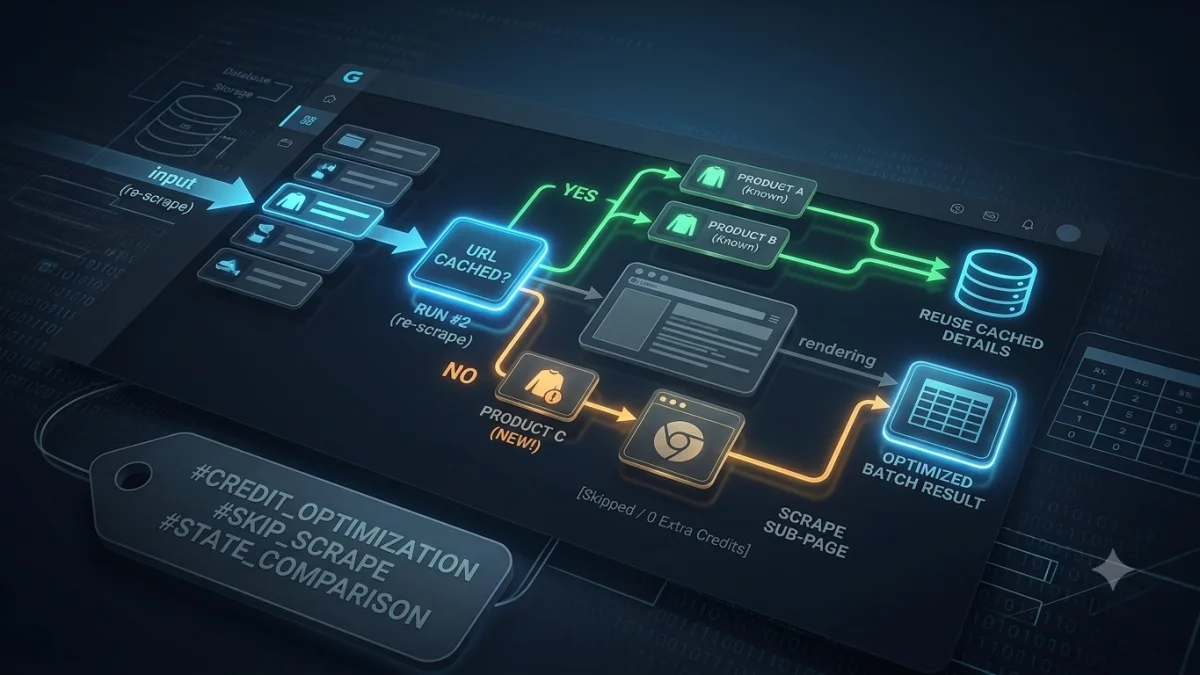
When you enable this option on your multi-page or list-and-detail workflows, Gluedly intelligently cross-references incoming product URLs against your workspace’s historical run log:
- For Existing Products: If a product URL was successfully scraped in a previous run, Gluedly reuses the stored detail fields (e.g., brand, specs, seller info) directly from your last successful run.
- For New Products: If a brand-new product URL appears on the main listing page, Gluedly spins up a fresh, parallel execution lane, opens the sub-page, and extracts its full detail schema.
Listing Page (Scraped)
│
├── Product A (Seen Before) ──► Reuses Cached Data (0 Extra Credits Spent)
├── Product B (Seen Before) ──► Reuses Cached Data (0 Extra Credits Spent)
└── Product C (NEW URL!)   ──► Opens Sub-Page Lane (Scrapes Detail Fields)
Why Your Pipelines Will Run 5x Faster
- Up to 90% Credit Savings: You only pay for full sub-page rendering when actual new inventory hits the platform.
- Blazing-Fast Run Times: By skipping hundreds of redundant HTTP handshakes and DOM renders, recurring batch runs complete in seconds instead of minutes.
- Reduced Proxy Load: Fewer requests dispatched to target domains means significantly lower risk of rate-limiting or anti-bot friction.
How to Enable It in Your Workflow
Activating smart caching takes a single click:
- Open your Workflow.
- Under the Workflow Settings, toggle on "Skip Sub-page Scrape for Known Products".
- Save and deploy your pipeline.
Gluedly will automatically start tracking product URLs across subsequent executions, saving you credits every time your scheduled runs execute!
🚀 Optimize Your Data Ingestion Today
Stop paying for duplicate web data. Head over to your dashboard, enable Skip Sub-Page Scrape, and watch your execution speeds skyrocket while your credit usage drops.