
· API · Donatas · 4 min read
LLM-Ready Markdown and a Cleaner Public API for Scrape Snapshots
Easily pull prompt-ready Markdown directly from your scrape rows, plus enjoy explicit snapshot IDs on the public API for effortless list → detail routing in RAG and agent pipelines.
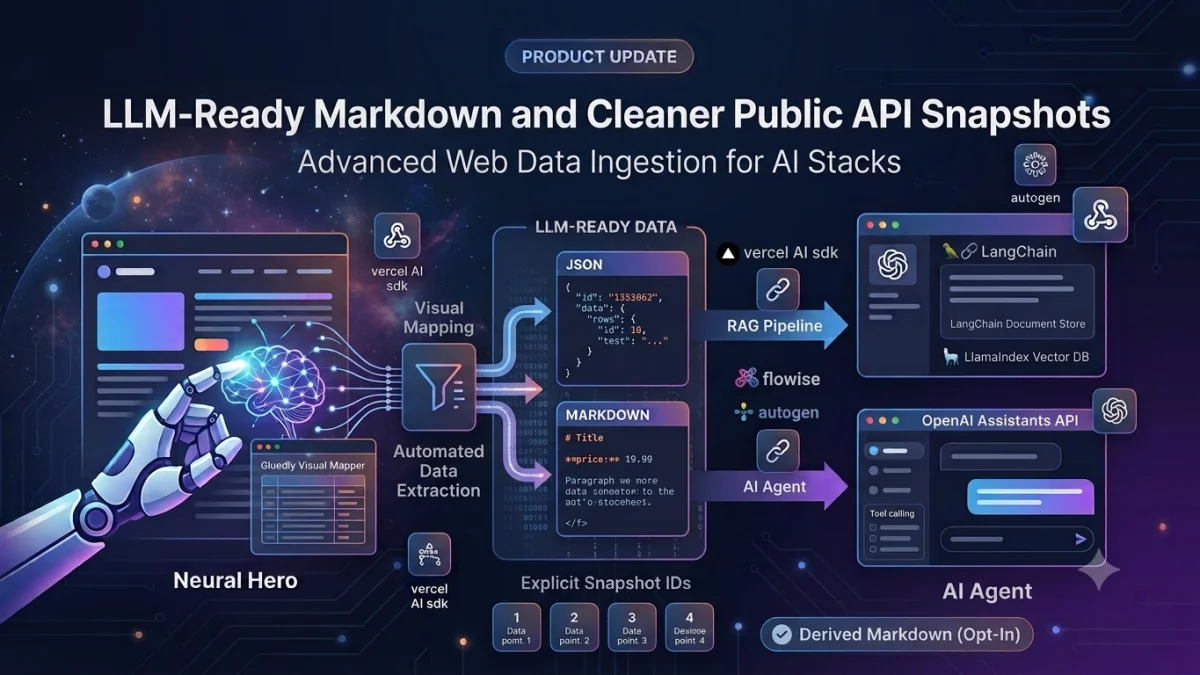
When wiring web data into a RAG pipeline or AI agent tool, developers usually need two things simultaneously:
- Compact, token-efficient text ready to drop straight into a prompt, chunker, or vector store.
- Schema-stable JSON you can rely on without rewriting custom extraction code every time a site changes.
Gluedly already provides schema-stable JSON from your mapped fields. To make integrating with AI toolchains even smoother, we’ve updated the public API to make scrape snapshot IDs explicit, and added an opt-in derived Markdown engine so every row can deliver prompt-ready text alongside clean JSON.
What’s New
1. Derived Markdown on Scrape Rows (Opt-In)
When you turn on Include Markdown in scrape results in your page settings, every row in the scrape envelope gains an automatically formatted markdown field constructed from your mapped data:
- Title-like fields automatically render as Markdown headings (
# Title). - URLs format directly into Markdown links (
[Link Text](url)). - Body, summary, and description fields convert into clean paragraphs.
- All other key-value pairs turn into key-labeled lines (
**Price:** 19.99).
💡 Note: If you manually map a field named
markdown, Gluedly respects your custom schema and won't overwrite your data.
You can also request a plain Markdown document for any single snapshot:
If Markdown is disabled for that page, the endpoint cleanly returns a 406 Not Acceptable error rather than generating unrequested content.
2. A Streamlined Public API Contract
We cleaned up the public pages endpoint to hide unnecessary internal model clutter (such as internal workflow states, failure details, or embed paths). The page schema is now intentionally lean:
Scrape snapshots follow this same predictable structure. Both List and Show endpoints clearly expose the snapshot id so your code can route to detail views without guessing:
Additionally, POST /api/v1/execute now returns data_id alongside page_id, giving synchronous scrapes instant routing to fetch exact snapshot records later.
Minimal Pipeline Code Example (LangChain / LlamaIndex)
Here is how easily you can pull and transform snapshot data into your vector stores or document pipelines:
import requests

API_KEY = "YOUR_API_KEY"
PAGE_ID = 12
BASE_URL = "https://gluedly.com/api/v1"

headers = {"Authorization": f"Bearer {API_KEY}"}

# 1. Fetch latest snapshot list
snapshots = requests.get(
    f"{BASE_URL}/pages/{PAGE_ID}/data",
    headers=headers,
    timeout=30,
).json()["data"]

latest_snapshot_id = snapshots[0]["id"]

# 2. Grab the specific snapshot payload
snapshot = requests.get(
    f"{BASE_URL}/pages/{PAGE_ID}/data/{latest_snapshot_id}",
    headers=headers,
    timeout=30,
).json()

# 3. Stream clean text and metadata into your AI framework
for row in snapshot["data"]["rows"]:
    prompt_text = row.get("markdown") or row.get("summary") or row.get("title", "")

    metadata = {
        "page_id": snapshot["page_id"],
        "data_id": snapshot["id"],
        "source_url": row.get("url"),
        "title": row.get("title"),
    }

    # Send `prompt_text` + `metadata` straight to your vector database / chunker
Why This Matters for AI Engineering Stacks
- 🚀 Eliminate Custom Adapters: Stable JSON key structures combined with derived Markdown mean your ingest code never has to parse or clean raw HTML.
- ⚡ Drastically Reduce Token Bloat: Send lean, mapped key-values and tight Markdown to LLMs instead of wasting context window space on web markup boilerplate.
- 🎯 Predictable API Routing: Explicit snapshot IDs make list → detail → webhook → re-fetch architectures clean and bulletproof.
- 🛡️ Opt-In Overhead: Markdown remains a per-page setting—if a microservice only needs compact JSON, your payload stays ultra-lean.
Getting Started
- Open your page in the Gluedly Dashboard.
- Toggle Include Markdown in scrape results in page settings.
- Trigger a manual execution or wait for your scheduled job.
- Call
GET /api/v1/pages/{page}/data, extract theid, and retrieve the clean payload withGET /api/v1/pages/{page}/data/{id}.
Full HTTP details are available in our interactive API documentation. Webhooks listening for data.created events deliver this exact same payload shape under payload.data!