
· Product updates · Donatas · 4 min read
Introducing Conditional Webhooks: Track Data Changes, Not Just Scrape Runs
Every scrape used to mean a noisy webhook, forcing you to waste time filtering out duplicates in Zapier or Make. With our new conditional webhooks (data.changed), you can now choose exactly which fields matter—like price or inventory status—and only get pinged when those specific values move.
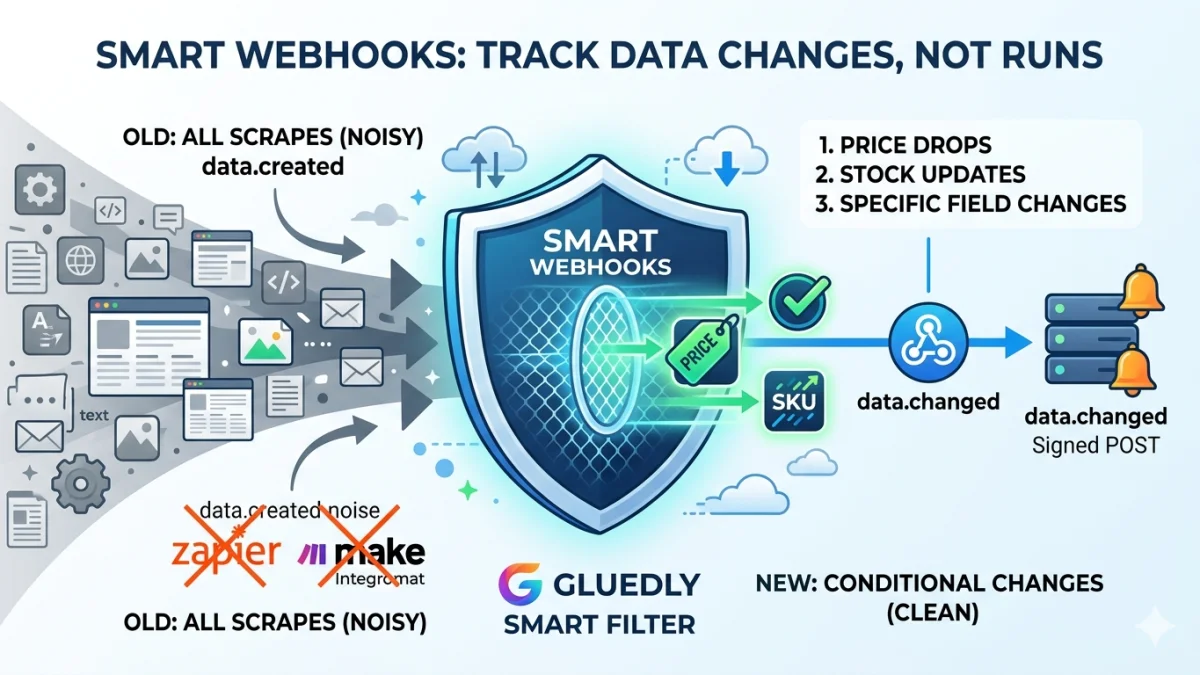
Smart Webhooks: Stop Filtering Noisy Scrapes
If you've ever set up a scraper, you know the pain. Every single run triggers a data.created webhook, whether the page actually changed or not. While that’s great for building a historical archive, it’s an absolute nightmare for alerts. You either end up wasting tasks filtering out the noise in Zapier or Make, or you just learn to ignore the notifications entirely.
We’re fixing that. This release introduces conditional webhooks via a brand-new data.changed event. Instead of blindly firing on every run, it compares the latest scrape to the previous one and only pings your server when the specific fields you care about actually move.
What’s New?
data.changedEvent: A fresh webhook option right inside your page’s Webhooks screen.- Field Watch Lists: Tell us exactly what matters to you—whether it's
price,title,availability, orSKU. - One-Click Presets: Get moving fast with pre-built setups like Prices only, Titles only, or Title + Price.
- Smart Field Groups: Set up conditional logic, like "only notify me if the title AND the price change on the same row."
- Stable Row Matching: Scraping a list where items shift around? Match items by a stable key (like URL or SKU) instead of their layout position so you don’t get false positives.
- Richer Payloads: Every ping now includes a
previous_data_idand achangesarray detailing the exact field, old value, and new value per row.
Note: Don't worry, your existing
data.createdanddata.deletedworkflows won't break. You can even combine them—usedata.createdto back up every snapshot to your data warehouse, anddata.changedto handle your live alerts.
How It Works Behind the Scenes
- The Baseline: We store each scrape as a unique snapshot. Because the very first scrape on a page doesn't have a "past" to look back at,
data.changedwill never fire on Run #1. - The Comparison: On the next run, we diff the new snapshot against the one right before it.
- The Filter: If you set up watch fields, we filter the results. If an unwatched field changes, we ignore it.
- The Delivery: If a watched change is detected, we POST to your URL using the same secure HMAC signing you use today (
X-Webhook-Signature,sha256=over the raw body).
For workflow scrapes (list + detail pages), everything works exactly as you'd expect. Integrations wait for the final, merged result once the whole workflow finishes, rather than firing on intermediate steps.
Choosing What to Watch
Head over to Pages → [Your Page] → Webhooks, subscribe to data.changed, and customize your triggers:
| Feature | Best For... | How it behaves |
|---|---|---|
| Individual Fields | "Tell me when a price moves." | Fires if any selected field changes (e.g., Price OR Stock). |
| Field Groups | Complex, multi-variable logic. | Fires only when all selected fields change in the same row (e.g., Price AND Title). |
| Match Rows by Field | Dynamic e-commerce or listing pages. | Keeps track of items even if the row order shifts, using a stable ID like a SKU. |
Field names are pulled directly from your Elements mappings. If multiple elements share a name, we simplify it in the UI so you're managing clean field names, not messy XPath.
Example Payload
When a change is detected, your endpoint will receive a clean JSON payload like this:
Just verify the signature, check the event type, and let your automation act on the changes array. No more writing custom diffing logic in your own backend.
data.created vs. data.changed
| Event | When it fires | Best Used For |
|---|---|---|
| data.created | Every single successful scrape. | Data warehousing, full backups, historical logging. |
| data.changed | Only when watched fields change. | Price-drop alerts, inventory trackers, SLA monitoring. |
| data.deleted | When a scrape row is removed. | Downstream database cleanup. |
Getting Started
- Make sure your page has mapped elements (specifically the ones you want to track).
- Go to the page's Webhooks tab and add your HTTPS endpoint URL.
- Check the box for
data.changed. - Select your fields, pick a preset, or set up a row-matching key for list pages.
- Hit Send Test to make sure your endpoint plays nice with our signed POSTs, and you're good to go! The system will start diffing as soon as the next baseline scrape lands.
Availability
Conditional webhooks are rolling out automatically to all paid plans that include webhook access. No action is required on your part—once the deployment hits your dashboard, you can start setting up your watch rules immediately.
Building a price monitor or a competitor tracker? We'd love to hear how you're using this. Drop us a line with your page layout—we’re actively looking for feedback on complex list layouts and unique alerting rules!